Embeddable Widget
The TeleID Widget is in an early experimental phase and is available for evaluation purposes only. The API and configuration options may change without notice. If you would like to see a live demo and/or give feedback before it's finalized, reach out to support@idkollen.se.
The TeleID Widget is an embeddable web component that lets you add remote identification to any web application.
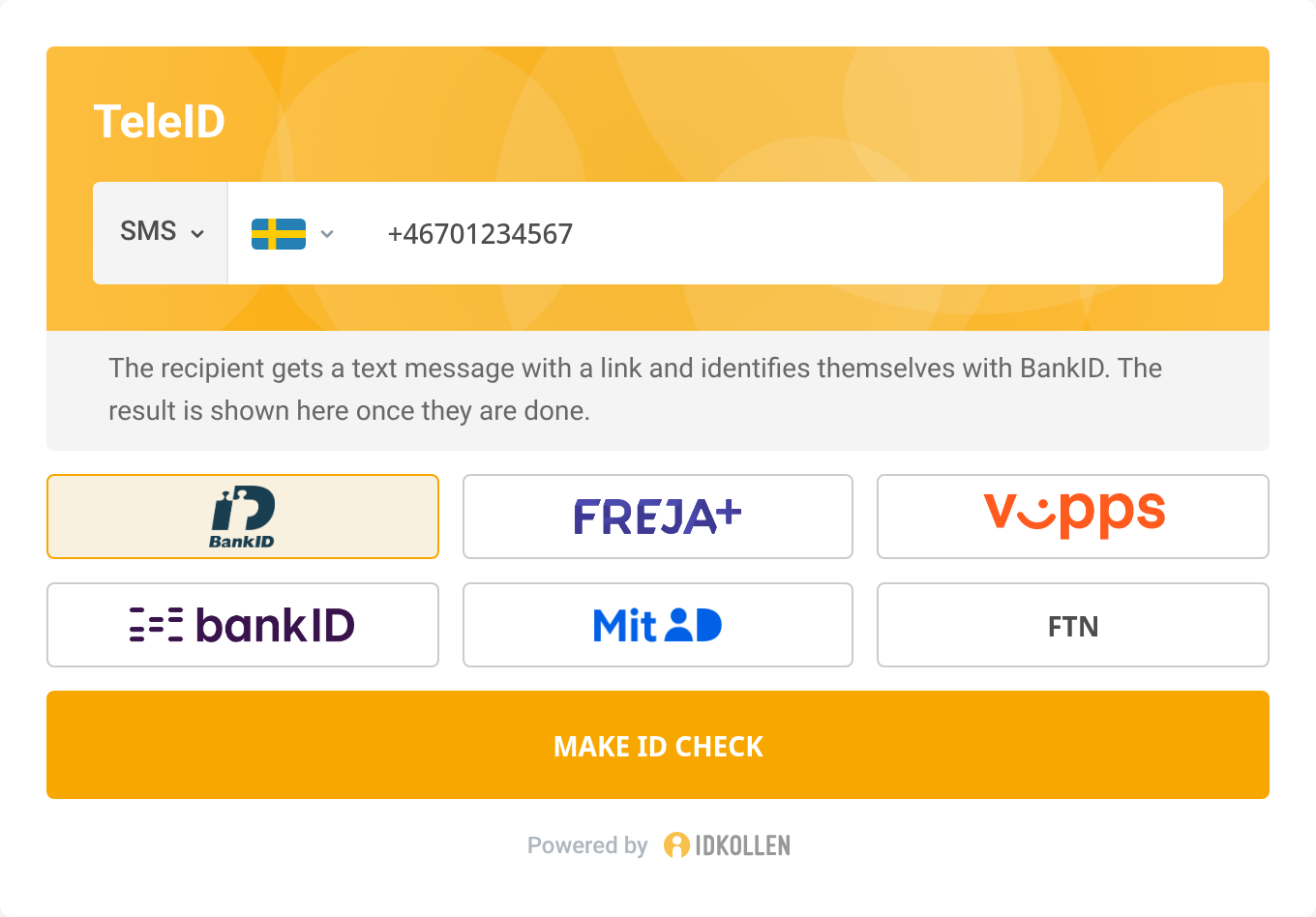
How it works
- The agent fills in the form and then clicks Make ID check.
- The recipient receives the request and completes the identification.
- The widget shows the verified result.
Installation
Script tag
Load the widget from jsDelivr. The script is self-contained, has no external dependencies and defines the global IdentisureTeleID.
<script src="https://cdn.jsdelivr.net/npm/@identisure/teleid-widget@0.2/dist/teleid-widget.js"></script>
@0.2 loads the latest 0.2.x release. Use an exact version such as @0.2.0 to control updates yourself.
npm
Install the package:
npm install @identisure/teleid-widget
Import it in your application:
import { IdentisureTeleID } from '@identisure/teleid-widget';
The package contains an ES module and TypeScript types. Lit is installed as a dependency instead of being bundled. Importing the package registers the teleid-widget custom element.
Container
Add a container element where the widget should appear:
<div id="teleid-widget"></div>
JavaScript API
Initialize the widget to get a handle to its API.
const widget = IdentisureTeleID.init({
  element: document.getElementById('teleid-widget'),
  baseUrl: '/identisure',
  language: 'ENGLISH',
  // customFetch: window.fetch,
});
| Field | Description |
|---|---|
| element | The container element, or a selector, where to insert the widget. |
| baseUrl | The base URL for the API. Defaults to /identisure. |
| language | The language for the widget: ENGLISH, SWEDISH, NORWEGIAN, DANISH, or FINNISH. Defaults to ENGLISH. |
| customFetch | Custom fetch implementation, for example to add authentication headers or CSRF tokens to requests to your backend. |
| brand | IDKOLLEN or IDENTISURE. Defaults to IDKOLLEN on .se sites and IDENTISURE on .dk, .no and .fi sites. On other sites, the first Nordic language among the visitor's preferred browser languages decides, and IDENTISURE is used if there is none. |
widget.fillForm(fields)
Fill form fields programmatically, for example with data already available in your application:
widget.fillForm({
  method: 'PHONE',
  phone: '+1234567890',
});
| Field | Description |
|---|---|
| method | Pre-select the method: SSN, PHONE, EMAIL, or CHAT. Inferred from ssn, phone or email when left out. |
| country | Pre-select the country of the SSN or phone number. Detected from the value when left out and unambiguous. |
| phone | Pre-fill the phone number field. |
| Pre-fill the email field. | |
| ssn | Pre-fill the SSN field. |
| provider | Pre-select the eID provider. |
| callInitiator | For BankID with SSN: USER if the person called you, RP if you called the person. Defaults to USER. |
Values that are not available for your account are ignored with a console warning. Calls made while an ID check is running are ignored.
widget.resetForm()
Cancels any running ID check, clears the form and resets the widget to its initial state.
widget.start()
Submits the form programmatically, equivalent to clicking the Make ID check button. Returns a Promise that resolves once the session has been created, or creating it failed. The widget then keeps waiting for the recipient in the background.
widget.resume(sessionId)
Shows and follows an ID check that was started earlier, for example before a page reload. Pass the id from the teleid:started event. Returns a Promise that resolves once the session's current status is known. A pending session is then followed like after start(), but without firing teleid:started, and the 10 minute timeout counts from the resume. While it runs, the widget shows a waiting view instead of the form, since the session's method and recipient are not known. A session that does not exist fails with the code NOT_FOUND. Can be called before the widget has finished loading.
widget.cancel()
Cancels the running ID check. Equivalent to clicking the Cancel button while the widget is waiting for the recipient. Does nothing once the ID check has finished.
Events
The widget fires DOM events on the container element. Use widget.addEventListener and widget.removeEventListener to listen to them:
widget.addEventListener('teleid:completed', (e) => {
  const { user } = e.detail;
  console.log(user.name, user.ssn);
});
| Event | Fired when | e.detail |
|---|---|---|
teleid:started | The session has been created and the link was sent. | { id } |
teleid:completed | The customer successfully identified themselves. | { id, user, identification } |
teleid:failed | The session failed. | { id, error, code } |
teleid:cancelled | The session was cancelled from the widget. | { id } |
teleid:timedout | The recipient did not identify themselves in time. | { id } |
user has the fields name, ssn and country. identification has the fields provider and, depending on the provider, certStartDate, bankIdNumber and orderRef.
id is missing from teleid:failed, teleid:cancelled and teleid:timedout when no session was created. For teleid:failed, error is the error message from your backend, or the code when there is none. code is one of CANCELLED, EXPIRED, ALREADY_IN_PROGRESS, CERTIFICATE, BIOMETRICS_NOT_ENABLED, TOO_MANY_REQUESTS, NETWORK, NOT_FOUND and UNEXPECTED.
Backend endpoints
Since API keys must never be exposed to the browser, the widget communicates with your own backend, which proxies calls to the IDkollen API. You need to implement four endpoints.
Eventually you will be able to use the IDkollen SDKs to implement these endpoints.
Fetch services
The widget will call this endpoint to check for supported settings.
GET {base-url}/service
Accept: application/json
Your backend should call GET /v3/service on the IDkollen API and return the response with a 200 status code.
Start authentication
The widget calls this endpoint when the agent submits the form.
POST {base-url}/teleid
Content-Type: application/json
Accept: application/json
Your backend should call POST /v3/teleid on the IDkollen API pass through the request body, and return the response with a 200 status code.
Fetch authentication status
The widget polls this endpoint to check progress.
GET {base-url}/teleid/{id}
Accept: application/json
Your backend should call GET /v3/teleid/{id} on the IDkollen API and return the response with a 200 status code.
Cancel authentication
The widget calls this endpoint when the agent cancels the authentication.
DELETE {base-url}/teleid/{id}
Your backend should call DELETE /v3/teleid/{id} on the IDkollen API and return a 204 response.
Support
For questions or to request access to the widget, contact support@idkollen.se.